Manage, backtest, and deploy a strategy
The strategy detail page separates three jobs: inspect the saved definition, evaluate it against historical data, and choose where it may run.
Open Strategies, then select a strategy name. Configuration-driven strategies expose Overview panels for Universe, Entry Logic, Position Growth, Exit & Protective Risk, Scheduled Logic, and Portfolio Limits. Python strategies expose their code editor instead.
Edit a managed strategy
- On the Overview tab, choose the edit action for the section you want to change.
- Update the section in the same asset-aware builder used during creation.
- Choose Save Strategy to save immediately, or Continue to review later steps before saving from Review.
- Return to Overview and confirm the saved summary reflects the intended definition.
This managed edit flow lets you change one lifecycle area without starting over, while still keeping the full strategy available for review. Re-run validation and testing after any material rule, sizing, schedule, or risk change.
Run a hypothetical backtest
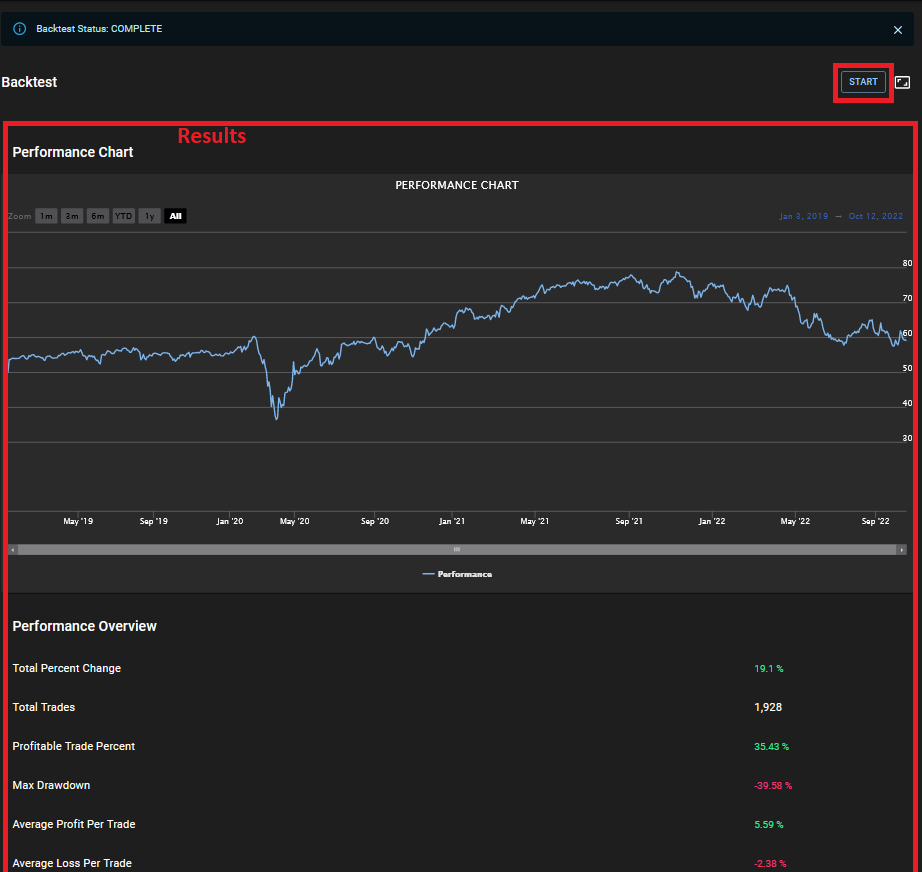
The Backtest tab runs the saved strategy against the selected historical window and available data. You can start a run, follow queued/running progress, stop an active run, and inspect results after completion. Follow the complete trading strategy backtesting guide when choosing dates and evaluating results.
Results can include portfolio value, return, drawdown, trade counts, win rate, risk-adjusted metrics, and individual closed trades, depending on the strategy and available data.
Use a virtual portfolio first
Deploying to an Investfly virtual portfolio evaluates the strategy going forward with simulated funds. This is useful for observing timing, state transitions, order behavior, scaling, exits, and scheduled jobs without authorizing real orders. Start with the paper trading simulator guide if virtual portfolios are new to you.
Simulation still differs from a broker account: fills, availability, market data, latency, and provider behavior can be different. Compare the virtual portfolio's Positions, Pending Orders, Trade History, Performance, and Automation views rather than relying only on a headline return.
Deploy to a portfolio
- Open the Deployment tab and choose a portfolio.
- Review the compatibility report. Asset type, broker, account capabilities, option structures, order behavior, and current product limits can block an incompatible deployment.
- For a live account, review the live-trading terms and any deployment controls such as excluded symbols or reserved buying power.
- Authorize deployment, then monitor its state and the portfolio's resulting orders and positions.
A compatibility pass means the current strategy/account combination is supported; it is not a recommendation or a guarantee that an order will be accepted or filled. Broker, exchange, market-data, and account restrictions still apply.
A practical review loop
- Read the complete Overview and document the intended behavior.
- Backtest multiple relevant periods and inspect the trades behind the metrics.
- Run forward in a virtual portfolio and observe real-time state changes.
- If you choose live use, start within limits you set and monitor positions, pending orders, errors, and provider status.
- After an edit, repeat the checks that the change could affect.
For the full configuration model, see Create a Trading Strategy, or use the broader trading bot workflow to choose an automation type.
Monitor, pause and retest
| Observation | Next action |
|---|---|
| Configuration differs from intended rules | Save the corrected draft and rerun relevant historical checks before deploying. |
| Queued/running historical test | Inspect progress/errors; it is not an active broker deployment. |
| Paper deployment with unexpected signal/order | Inspect logs, account state and pending orders; pause/undeploy before changing material logic. |
| Source file edited locally | Upload/save the new code and review the deployment; do not assume local changes update a running copy. |
| Ready to change account | Recheck broker/instrument compatibility and obtain separate live authorization. |
Backtest completion, deployed state, order submission and filled position are separate checkpoints. See saved-rule review, test assumptions and deployment access.
Interpret the displayed deployment and logs
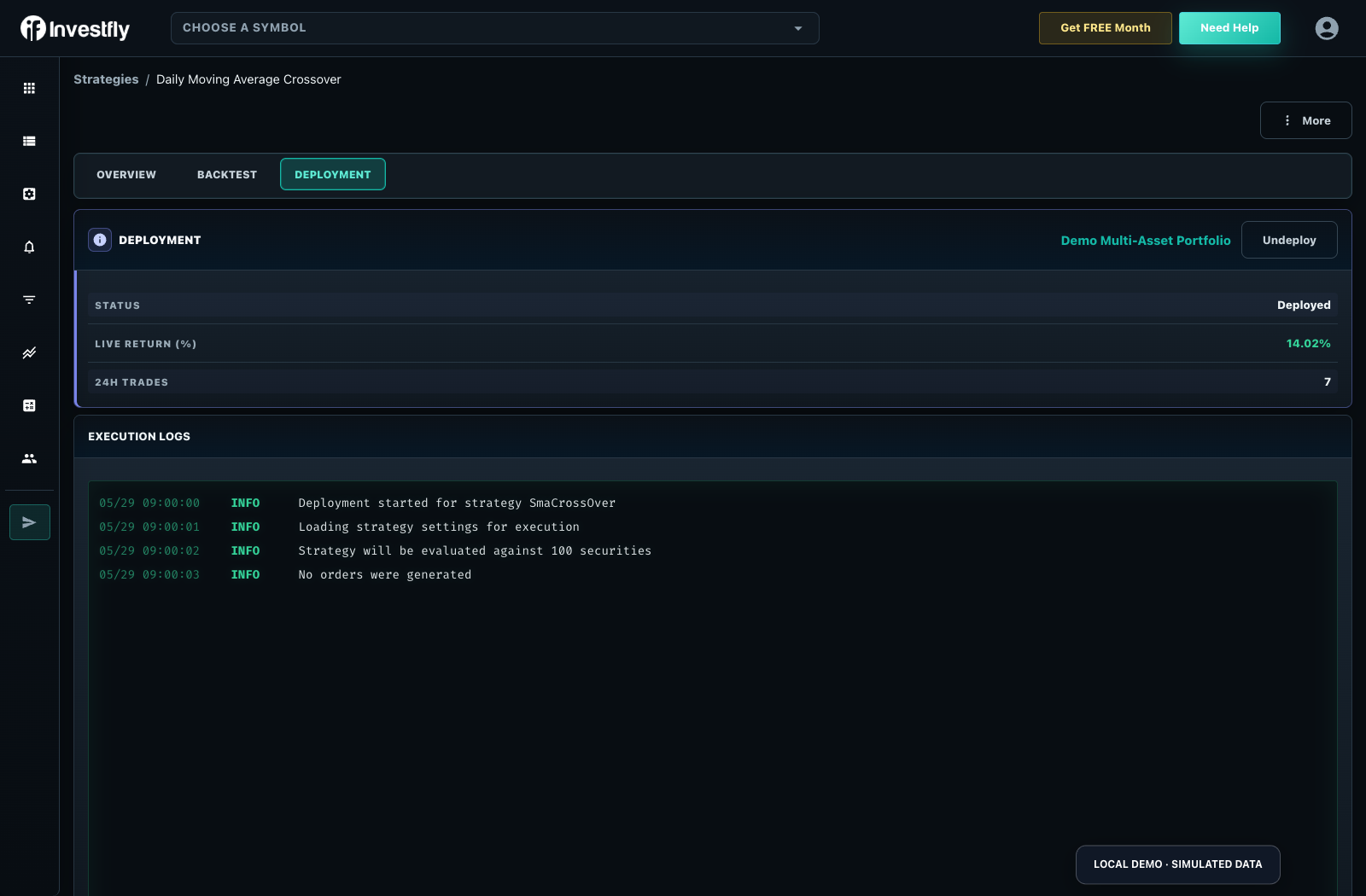
The actual Deployment screenshot above uses a fictional local demo account. Its status is Deployed and the account name identifies a virtual portfolio. The log sequence reads “Deployment started for strategy SmaCrossover,” “Loading strategy settings for execution,” “Strategy will be evaluated against 100 securities,” then “No orders were generated.” Those seeded demonstration messages show where to inspect startup and evaluation; they are not evidence that the strategy filled an order. The screen’s generic “Live Return” label does not turn this virtual account into real-money performance.
For your own paper run, confirm the intended account, saved configuration, timestamp and current log stream. If the stream stalls or reports errors, inspect that issue before expecting positions. Match any submitted order to its pending/fill state, then to the eventual closed record. Review paper-order states and trigger-versus-fill behavior.