Create a trading strategy
A Trading Strategy is the complete automation workflow: it can select an asset universe, generate entries, manage existing positions, run scheduled jobs, apply exits, and enforce portfolio-level limits.
Use a Market Automation for a focused notification or order on one condition. Use a strategy when the rules must coordinate the full position lifecycle or be backtested as a system.
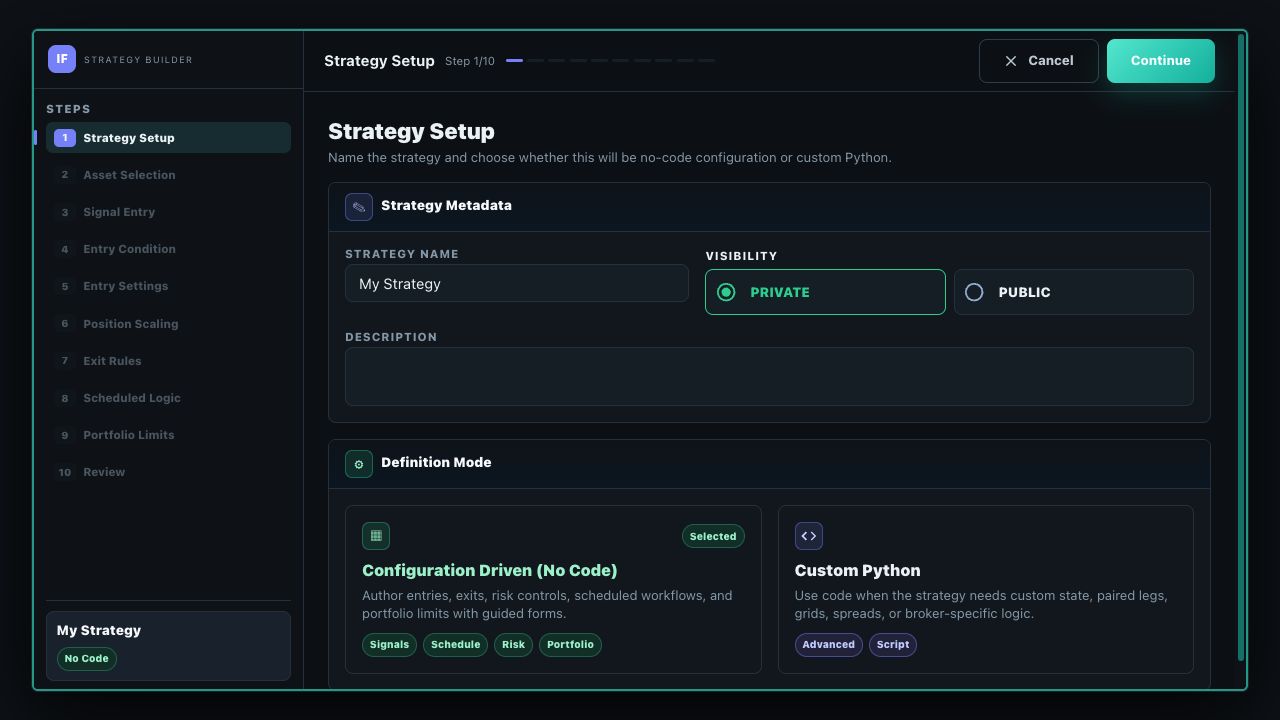
Start a strategy
- Open Strategies and choose New Strategy.
- Name the strategy, set its visibility, and add a description that records its intent and assumptions.
- Choose Configuration Driven (No Code) for the guided builder, or Custom Python for logic that needs custom state or code.
- Complete the asset-aware steps, review the complete definition, and save it.
Standard Strategy steps
| Step | What you decide |
|---|---|
| Strategy Setup | Name, description, visibility, and no-code or Python definition mode. |
| Asset Selection | Equity, crypto, forex, futures, or options. Later controls change to match the selected asset. |
| Signal Entry | Whether signal-driven entry is enabled and how a true condition produces a new signal. |
| Entry Condition | The universe and expression that qualify an entry. |
| Entry Settings | Direction, position size, market or limit execution, duration, and unfilled-order handling. |
| Position Scaling | What to do with repeat entry signals and, where supported, favorable- or adverse-move add rules. |
| Exit Rules | Signal exits, profit-taking, protective stops, trailing or break-even behavior, and time-based exits. |
| Scheduled Logic | One or more named jobs that enter or rebalance positions on their own schedules and guards. |
| Portfolio Limits | Caps such as concurrent positions, per-symbol exposure, buying-power use, or asset-aware margin. |
| Review | A final read-through of every enabled rule before saving. |
Futures add a Contract Lifecycle step. Options add Contract Selection and Contract Lifecycle steps for structures, legs, expiration criteria, and supported lifecycle actions.
Signal Mode and Repeat Signal are different
These controls answer two separate questions:
- Signal Mode — On False → True: emit an entry only when the expression changes from false to true. It does not keep emitting while the expression stays true.
- Signal Mode — When True: the condition is eligible on each strategy evaluation while it is true, subject to the rest of the strategy's guards and limits.
- Repeat Signal — Ignore Repeat: if the same-side entry signal arrives while that position already exists, do not add to it.
- Repeat Signal — Add To Position: treat an eligible repeat signal as a pyramiding add. You can constrain it with a maximum number of adds, cooldown, size ladder, and an optional only-if-winning guard.
Configure position scaling
Scaling rules add to an existing position; they do not replace the original entry rule. Each enabled rule has its own limits and sizing.
- Repeat-signal add: adds when the entry setup emits again.
- Favorable-move add: adds after the position moves in your favor by the configured interval.
- Adverse-move add: adds after a configured adverse move where this rule is supported. A hard add cap is required.
Move thresholds are asset-native: percentage moves for equities and spot crypto, ticks for futures, and pips for forex. The builder hides combinations the runtime does not support. Add steps can use a fixed amount or a percentage of the base entry size, and the average entry price becomes the basis for supported move rules.
Add scheduled jobs
Scheduled Logic is a collection of named jobs, not one global timer. You can add, duplicate, reorder, edit, or remove jobs independently. Available job types include:
- scheduled single-asset entry;
- scheduled multi-asset entry;
- target-allocation rebalance;
- ranked-universe rebalance; and
- scheduled option entry for option strategies.
Each job owns its schedule, eligibility guards, and trade intent. A strategy may use signal entries, scheduled jobs, or both; signal entry can be disabled when at least one scheduled job is configured.
Asset-aware behavior
The builder changes its choices and validation by asset. Equity and crypto can size by units, notional value, or equity percentage. Futures use contract and margin concepts. Forex uses currency-pair and pip-aware controls. Options begin with an underlying universe, then select an option structure and contracts from criteria such as expiration, strike, or delta.
Available order actions, data, structures, and deployment destinations also depend on the portfolio provider and account. The deployment compatibility check is the final authority for a particular strategy/account pairing.
Review before testing
Read the Review step as a complete specification: check disabled sections as carefully as enabled ones, confirm that every cap has the intended unit, and verify how simultaneous rules interact. After saving, the strategy detail page organizes the definition into Overview panels and provides separate Backtest and Deployment workflows.
Verify a complete saved configuration
Inspect SMA CrossOver, use Customize to save a private draft, and review every setting before running it.
| Reported historical period | Matched closed-trade records | Last completed run |
|---|---|---|
| 2026-09-03 to 2026-10-09 | 15 | 2026-10-10 |
Historical simulation, not live performance. Partial closes may create multiple matched records. The run uses available history; its dates can change as data refreshes. Inspect costs, fills, missing data and warnings in the full report. These settings demonstrate software behavior, not a recommended strategy.
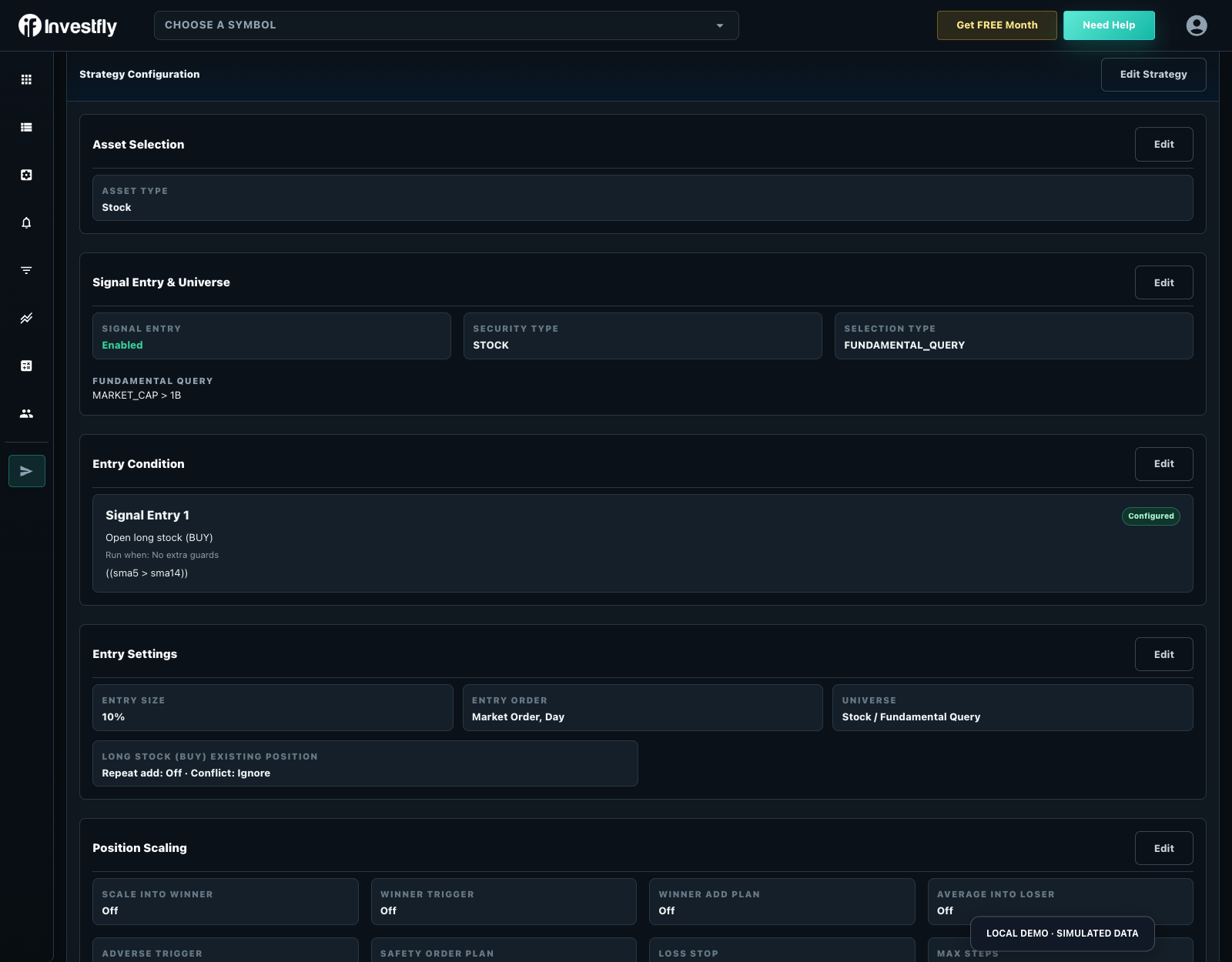
Review universe and asset, condition interval, entry edge, position size, order request, exit tiers, protection adjustments and portfolio limits together. Compare the saved Overview with the editor after each material change. Then inspect the first historical trades instead of treating a successful save as proof of correct logic.
Concepts explains tool behavior; Build a bot compares routes; this page documents the saved strategy configuration. Use the deployment lifecycle guide next.